Configuration
Sendspin Bluetooth Bridge stores persistent settings in config.json inside the /config directory. You can manage those values through the web UI, through the Home Assistant addon options, or by editing the file directly.
Configuration surfaces
Section titled “Configuration surfaces”There are two main ways to manage settings:
| Surface | Best for | Notes |
|---|---|---|
| Web UI | Day-to-day management of devices, adapters, Bluetooth inventory, auth, and runtime behavior | Works for Docker, LXC, and addon installs |
| HA addon Configuration tab | Supervisor-managed addon options | Useful when you prefer HA-native editing or need to seed addon options outside the web UI |
Web UI configuration
Section titled “Web UI configuration”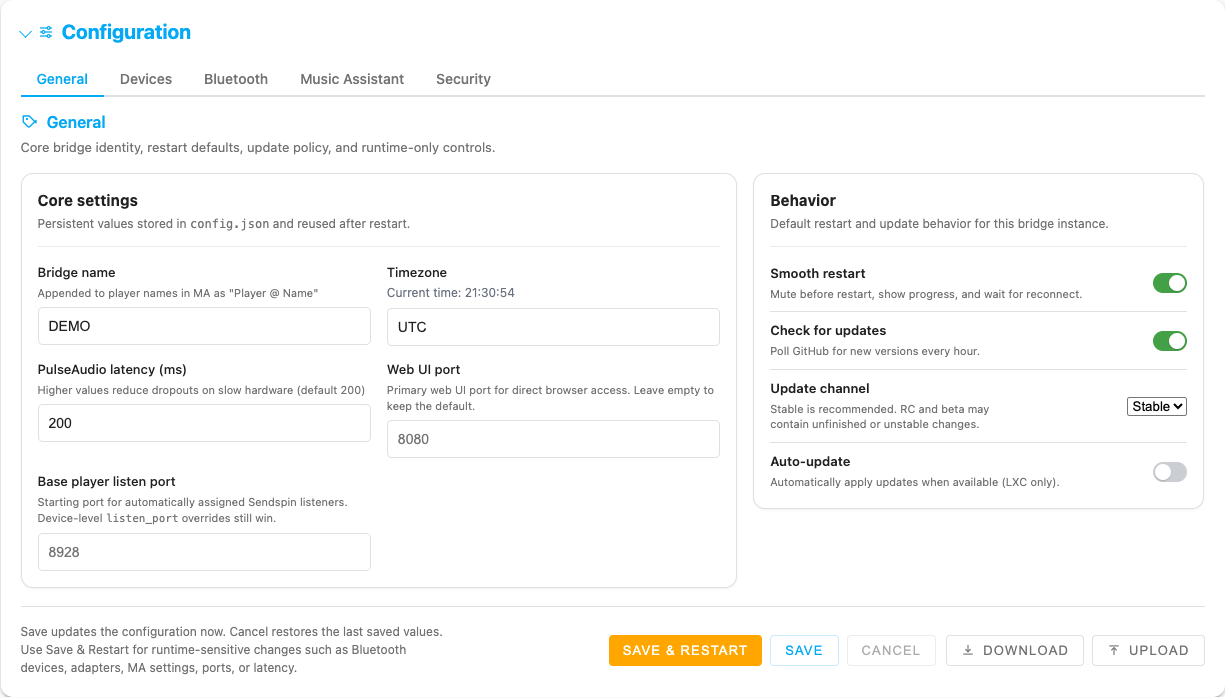
The configuration area is organized into five tabs instead of one long form.
| Tab | What lives there |
|---|---|
| General | Bridge name, timezone, latency, ports, restart behavior, update policy, and guidance visibility |
| Devices | Saved speaker fleet table and advanced per-device fields |
| Bluetooth | Adapter naming, paired-device inventory, scan modal, reconnect policy, codec preference |
| Music Assistant | Connection status, reconfigure flow, token helpers, MA endpoint, monitor, volume/mute routing |
| Security | Local auth, session timeout, and brute-force protection |
General tab
Section titled “General tab”The General tab contains settings that apply to the whole bridge instance:
- Bridge name — appended to player names as
Player @ Name. - Timezone — with a live preview of the current local time.
- PulseAudio latency (ms) — higher values trade latency for stability on slower hardware.
- Web UI port — direct browser port for Docker / LXC / systemd installs. Ignored in HA addon mode, where Home Assistant Supervisor assigns the ingress port dynamically.
- Base player listen port — starting port for automatically assigned per-device sendspin listeners.
- Smooth restart — mutes before restart and shows restart progress.
- Show empty-state onboarding guidance — controls whether the first-run checklist stays visible when setup is incomplete.
- Show recovery banners — controls whether top-level operator/recovery notices stay visible.
- Check for updates / Update channel / Auto-update — available outside HA addon mode, with auto-update limited to supported runtimes.
If you leave the port fields empty, standalone installs default to 8080 for the web UI and 8928 for player listeners. In Home Assistant addon mode, all three channels (stable / rc / beta) ship with ingress_port: 0, so HA Supervisor picks a free port at runtime — that change shipped in v2.55.0 to stop addon variants from colliding with Matter / Thread and other host-network addons. The per-channel base listener defaults (8928 / 9028 / 9128) are still meaningful — they keep the device listeners disjoint when several addon variants run side-by-side. WEB_PORT set inside the addon is ignored; access the UI via the Home Assistant sidebar entry instead.
Devices tab
Section titled “Devices tab”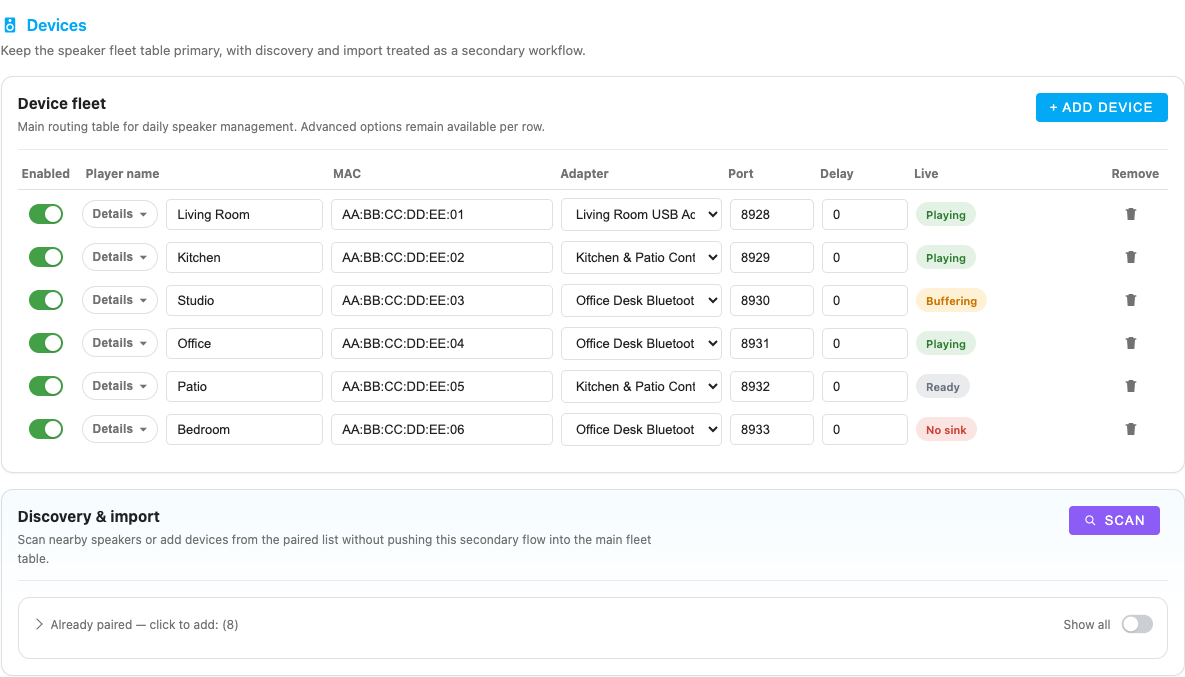
The Devices tab is now the canonical saved fleet table.
Each device row can store:
| Field | Purpose |
|---|---|
| Enabled | Skip a device in the saved fleet without deleting it |
| Player name | Display name in Music Assistant |
| MAC | Speaker Bluetooth address |
| Adapter | Specific adapter binding, if needed |
| Port | Optional custom listen_port; otherwise the bridge uses BASE_LISTEN_PORT + device index |
| Delay | static_delay_ms post-sink hardware latency compensation (0–5 000 ms, default 300 for new devices) |
| Live | Runtime badge such as Playing, Connected, Released, or Not seen |
| Actions | Remove the row or act on the saved configuration |
Advanced row details expose:
- Preferred format such as
flac:44100:16:2. - Listen host override (
listen_host) for the advertised device address. - Keepalive interval (
keepalive_interval) for speakers that go to sleep aggressively.
Current runtime behavior is interval-based: any positive keepalive_interval enables silence keepalive, values below 30 seconds are raised to 30, and 0 or an empty field disables it. Older Home Assistant addon configs may still contain the legacy keepalive_silence flag, but the current bridge behavior keys off keepalive_interval > 0.
Per-speaker latency and synchronization
Section titled “Per-speaker latency and synchronization”The UI keeps three different measurements separate:
- BT delay is the advisory AVDTP delay reported by the speaker through BlueZ. It includes the peer’s buffering/decoder/DSP estimate, but it is firmware-reported rather than acoustically measured.
- Delay is the configured
static_delay_mscorrection. Its compact stepper lives in Configuration → Devices, immediately before Bluetooth actions. Select a shared ±10/±50 step and use minus/plus for live tuning; changes are applied through IPC without restarting the player. - Backend/buffer/clock metrics are sampled from the running Sendspin audio path and exposed in diagnostics and Home Assistant. They describe the host and clock-sync path, not the hidden acoustic delay inside the speaker.
When BlueZ exposes no delay report, the bridge uses a codec starting point once when a device is first registered (125 ms for SBC/AAC/aptX/LDAC, 40 ms for aptX LL/FastStream, 20 ms for LC3). After that initialization, live tuning and microphone calibration remain authoritative and later observations never overwrite the user’s value.
The advanced device row also contains Startup lead (required_lead_time_ms) and Minimum buffer (min_buffer_ms). Both hot-apply to compatible aiosendspin versions. Increase them when repeated re-anchors indicate that the Bluetooth/QEMU path is exhausting the default 250 ms headroom; they do not replace static_delay_ms.
The metronome button plays a continuous synchronized click track directly through the selected Bluetooth sink. The microphone button starts a relative calibration between two speakers: open the UI through HTTPS or localhost, keep the phone fixed, and let the three reference/target trials finish. Recordings remain in memory for at most ten minutes. The result compensates the faster speaker; it is relative rather than a certified end-to-end absolute latency measurement.
Bluetooth tab
Section titled “Bluetooth tab”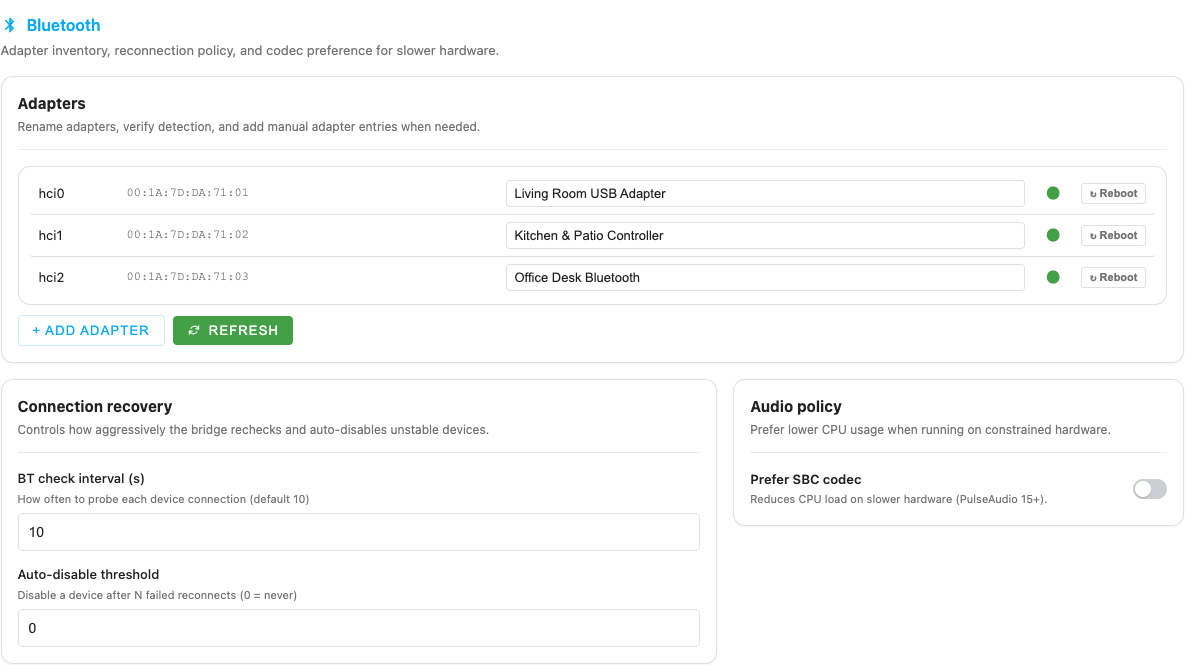
The Bluetooth tab combines inventory, discovery, and policy:
- Rename adapters for clearer dashboard labels.
- Add manual adapter entries when auto-detect is incomplete.
- Refresh detection without leaving the page.
- Work from the Paired devices inventory for import, repair, or cleanup.
- Open the dedicated Scan nearby modal from this tab.
- Set BT check interval for reconnect probing.
- Set Auto-disable threshold for unstable devices. When the threshold is reached, the device is persisted as disabled until you re-enable it.
- Toggle Prefer SBC codec to reduce CPU load.
Scan nearby modal
Section titled “Scan nearby modal”The Bluetooth scan flow is now its own modal rather than an inline card:
- choose the specific adapter that should scan; the first detected adapter is selected initially;
- leave Audio devices only enabled for normal speaker discovery;
- watch the countdown and progress bar while the scan runs;
- use Add or Add & Pair directly from the results;
- use Rescan after the cooldown without reopening the modal.
If the host already knows the speaker, the Already paired devices list is usually faster than scanning again.
Music Assistant tab
Section titled “Music Assistant tab”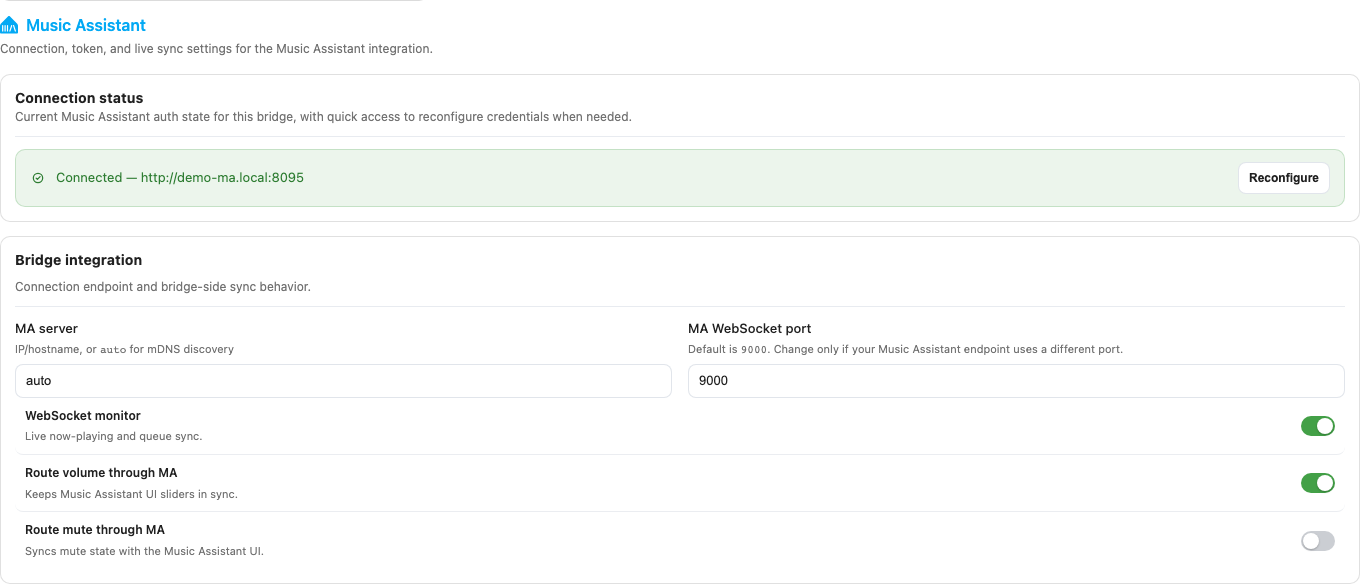
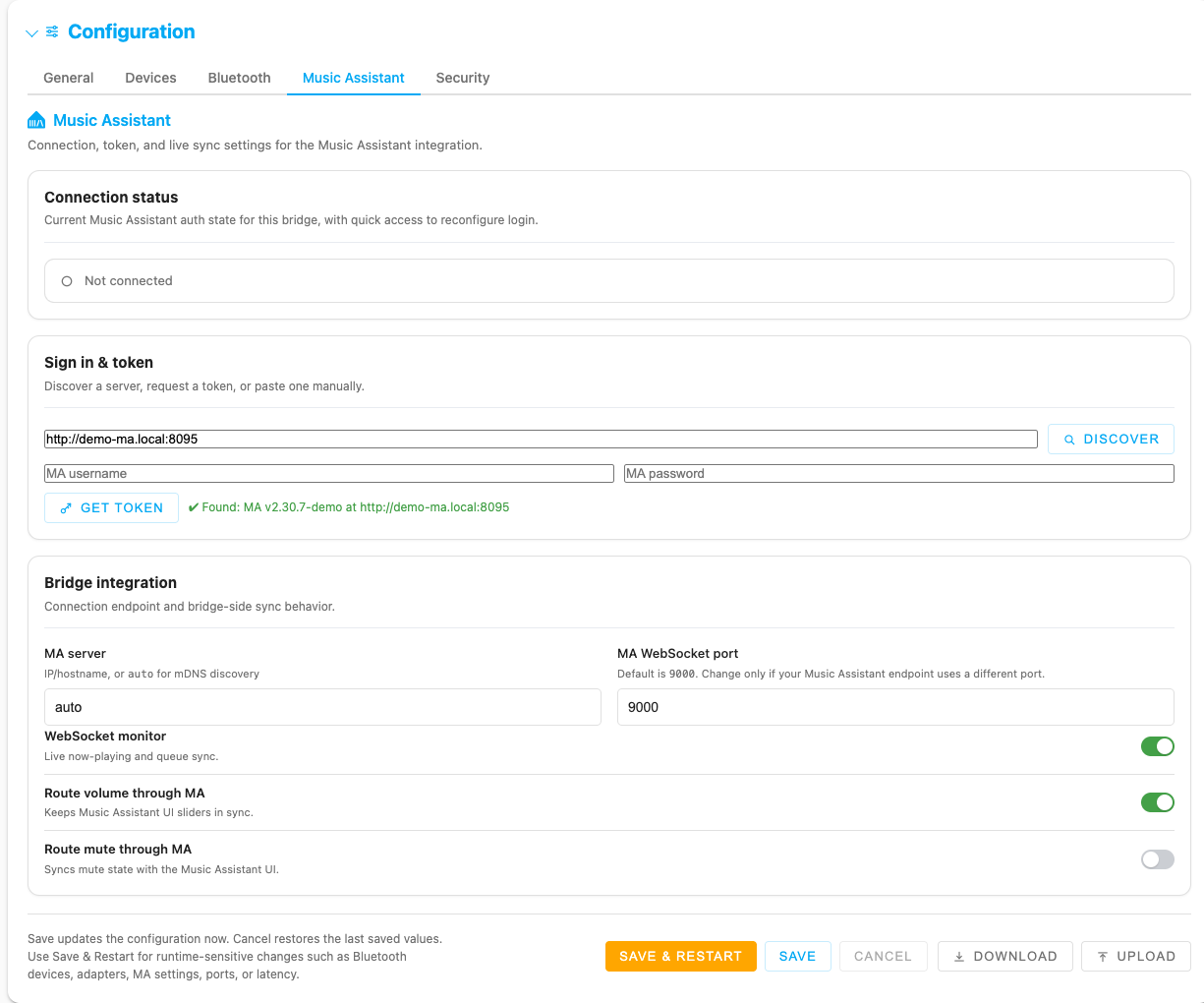
The Music Assistant tab includes both connection state and auth helpers:
- Connection status card showing whether the bridge is connected and which account/token last authenticated it.
- Reconfigure button on that status card once a working token already exists.
- Discover nearby MA servers or reuse a known URL.
- Get token with MA credentials. On success the bridge stores
MA_API_URL, a long-livedMA_API_TOKEN, andMA_USERNAME; the password is not stored. - Home Assistant fallback when the MA instance is HA-backed and direct MA login needs HA OAuth / MFA.
- Get token automatically for HA-backed MA targets.
- Manual MA API token field.
- MA server and MA WebSocket port for the sendspin endpoint.
- WebSocket monitor, Route volume through MA, and Route mute through MA toggles.
A few behaviors matter when documenting or operating the MA flow:
- The Sign in & token card hides itself when the connection is healthy, then reappears when you click Reconfigure or when the bridge is not connected.
- Get token automatically is relevant only for HA-backed Music Assistant targets.
- Auto-get token on UI open is an addon-oriented convenience setting. It works only when the page is running under HA Ingress and the browser already has a valid Home Assistant session/token.
- If silent auth cannot complete, the UI falls back to the visible HA-assisted or manual token flow.
Security tab
Section titled “Security tab”In standalone deployments, the Security tab controls local access to the web UI:
- Enable web UI authentication.
- Session timeout in hours (1–168).
- Brute-force protection toggle.
- Max attempts, Window, and Lockout policy fields.
- Set password flow for the local password hash.
Standalone login uses CSRF-protected forms plus a SameSite=Lax, HttpOnly session cookie. In Home Assistant addon mode, auth is always enforced by Home Assistant / Ingress instead, so the standalone security controls are hidden.
Footer actions
Section titled “Footer actions”The footer is shared across tabs:
- Save writes
config.jsonnow and applies changes on-line where possible. Per-device tuning (static_delay_ms, idle mode, room metadata) is hot-applied via IPC to the running daemon subprocess. Fields that bind at spawn time (listen_port,preferred_format,adapter,player_name) trigger a warm restart of the single affected subprocess (~3–5 s of silence on that speaker). Global fields that drive every subprocess (SENDSPIN_SERVER,BRIDGE_NAME,PULSE_LATENCY_MSEC, BT tuning) warm-restart every running speaker in parallel. The save response toast shows exactly what was applied, what is restarting, and what still needs a full bridge restart. - Save & Restart saves and restarts immediately. Use this for Flask-bound
fields (
WEB_PORT, auth/session settings,SECRET_KEY, brute-force limits) or when adding a brand-new device MAC that wasn’t running before. - Cancel restores the last saved values in the form.
- Download exports a share-safe timestamped JSON file with secrets such as
MA_API_TOKEN, password hash, and secret key removed. - Upload imports a previously exported config and preserves the existing password hash, secret key, and stored MA token on the server.
Home Assistant addon options
Section titled “Home Assistant addon options”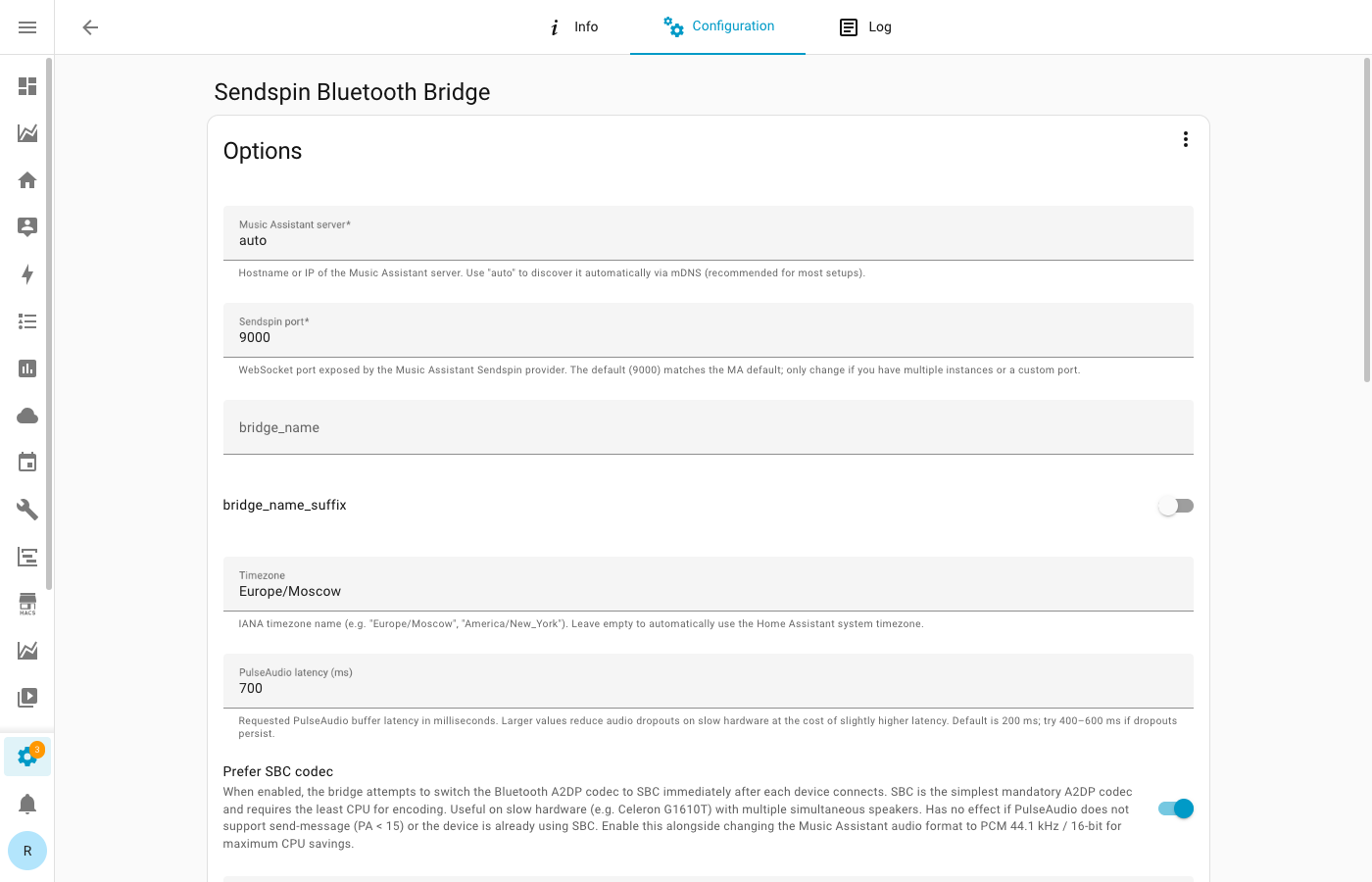
When running as a Home Assistant addon, the Supervisor exposes a native Configuration tab in HA.
Go to Settings → Add-ons → Sendspin Bluetooth Bridge → Configuration.
Core addon options include:
| Option | Purpose |
|---|---|
| sendspin_server | Hostname/IP of the Music Assistant server (no scheme prefix, no port, no path — just 192.168.1.11 or ma.local), or auto for mDNS |
| sendspin_port | Sendspin WebSocket port — default 8927 matches Music Assistant’s Sendspin provider. Legacy 9000 configs keep working; the bridge probes and auto-shifts if the configured port is closed |
| web_port | Read but not applied in addon mode; Supervisor assigns the ingress port dynamically. Kept in the schema for legacy parity — you can leave it blank. |
| base_listen_port | Starting port for auto-assigned device listeners |
| bridge_name | Optional instance label appended to players |
| tz | IANA timezone |
| pulse_latency_msec | Audio buffer latency hint |
| prefer_sbc_codec | Lower-CPU codec preference |
| bt_check_interval | Reconnect polling interval |
| bt_max_reconnect_fails | Auto-disable threshold |
| auth_enabled | Direct-listener auth toggle; HA addon mode still enforces HA auth regardless |
| ma_api_url / ma_api_token | Music Assistant REST integration |
| ma_auto_silent_auth | Allow addon/Ingress pages to try silent HA-backed MA token creation on open |
| volume_via_ma / mute_via_ma | Route controls through MA to keep UI state aligned |
| update_channel | In-app release-lane preference for update checks and warnings |
| log_level | Base logging verbosity |
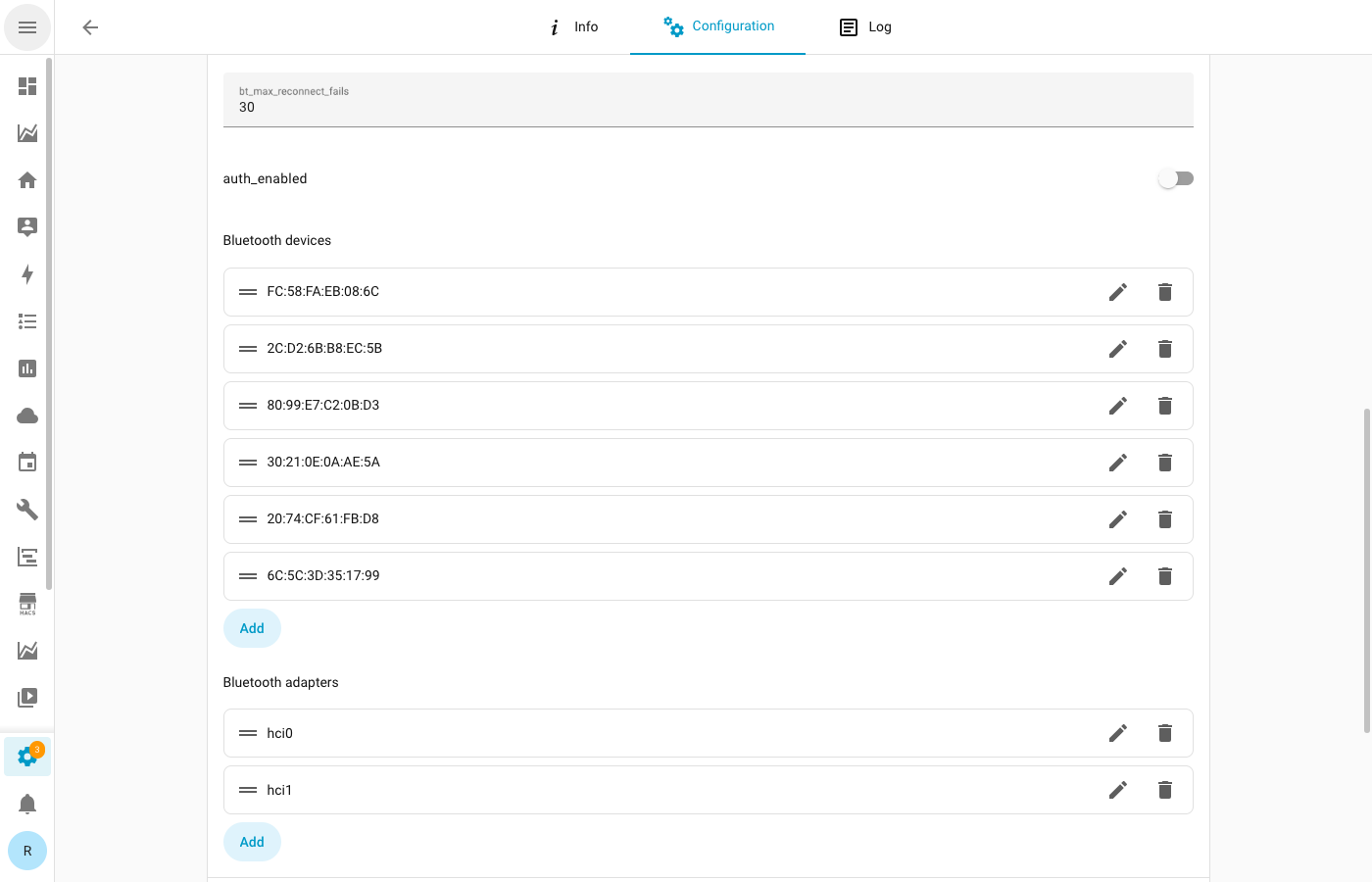
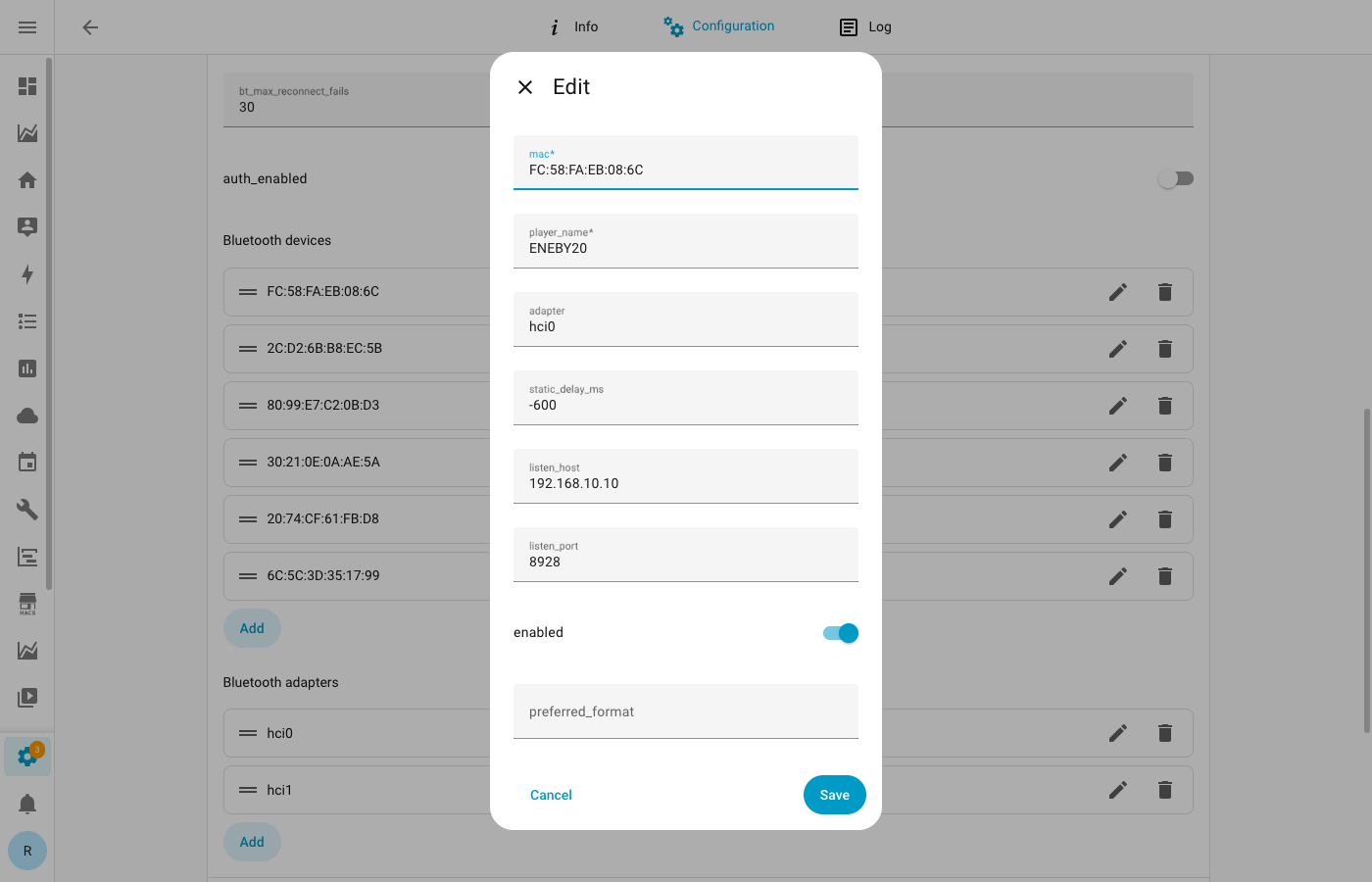
The addon form also exposes the full Bluetooth devices and Bluetooth adapters structures. Older addon configs may still preserve a legacy keepalive_silence field during translation, but current runtime behavior is driven by keepalive_interval.
Port and listener strategy
Section titled “Port and listener strategy”Top-level web and listen ports
Section titled “Top-level web and listen ports”The bridge supports two optional top-level port overrides:
| Key | Applies to | Default | Notes |
|---|---|---|---|
WEB_PORT | Web UI listener | 8080 outside HA addon mode | Ignored in HA addon mode. HA Supervisor dynamically assigns the ingress port at runtime (the addon manifest declares ingress_port: 0), so there is no fixed addon port for WEB_PORT to override. Access the UI via the addon’s Home Assistant sidebar entry. |
BASE_LISTEN_PORT | Auto-assigned per-device Sendspin listeners | 8928 outside HA addon mode | Used as the starting port when a device does not define its own listen_port. Honoured in all runtimes including HA addon mode. |
In Home Assistant addon mode, the listener ranges are intentionally separated by channel so that multiple addon variants can co-exist on the same HAOS host without colliding on per-device listener ports:
| Installed addon track | Channel base listen port | Channel web-port fallback |
|---|---|---|
| Stable | 8928 | 8080 |
| RC | 9028 | 8081 |
| Beta | 9128 | 8082 |
The base listen port column is the active default for that channel and shows up directly in the device listener URLs. The web-port fallback column is a safety value used only if the bridge cannot reach /addons/self/info on the Supervisor REST API to read the dynamically assigned ingress port — in normal operation you will never see those numbers, because Supervisor returns its own runtime-assigned port and the UI is served on that.
Use overrides only when you need:
- a custom web port for Docker / LXC / systemd deployments (HA addon mode does not currently support a direct non-Ingress listener —
WEB_PORTis read but discarded); - a different starting point for the device-listener range on the same host (e.g. running two non-addon bridge instances).
Per-device listener overrides
Section titled “Per-device listener overrides”Each Bluetooth device may also define its own listen_host and listen_port.
Use device-level overrides when:
- a single speaker must keep a stable known port;
- you are splitting devices across several bridge instances and want explicit port planning;
- you need to avoid a collision without moving the whole bridge’s base range.
config.json reference
Section titled “config.json reference”Core keys
Section titled “Core keys”| Key | Type | Description |
|---|---|---|
SENDSPIN_SERVER | string | Music Assistant host or auto |
SENDSPIN_PORT | integer | Sendspin WebSocket port |
WEB_PORT | integer or null | Optional web UI port override |
BASE_LISTEN_PORT | integer or null | Optional base port for auto-assigned device listeners |
BRIDGE_NAME | string | Optional label appended to player names |
TZ | string | IANA timezone |
PULSE_LATENCY_MSEC | integer | Audio buffer latency hint |
BT_CHECK_INTERVAL | integer | Probe interval for Bluetooth recovery |
BT_MAX_RECONNECT_FAILS | integer | Auto-disable threshold; 0 means unlimited |
BT_CHURN_THRESHOLD | integer | Rapid-reconnect churn-isolation threshold; 0 disables |
BT_CHURN_WINDOW | number | Time window in seconds for churn detection (default 300) |
PREFER_SBC_CODEC | boolean | Lower-CPU codec preference |
DISABLE_PA_RESCUE_STREAMS | boolean | Unload PulseAudio module-rescue-streams at startup to prevent sink drift on reconnect |
DUPLICATE_DEVICE_CHECK | boolean | Cross-bridge duplicate device detection |
AUTH_ENABLED | boolean | Enable local web auth outside HA addon mode; HA addon mode always enforces auth |
SESSION_TIMEOUT_HOURS | integer | Browser session lifetime |
BRUTE_FORCE_PROTECTION | boolean | Enable temporary lockout after failed sign-ins |
BRUTE_FORCE_MAX_ATTEMPTS | integer | Maximum failed attempts within the window |
BRUTE_FORCE_WINDOW_MINUTES | integer | Rolling window for failed attempts |
BRUTE_FORCE_LOCKOUT_MINUTES | integer | Lockout duration |
MA_API_URL | string | Music Assistant REST URL |
MA_API_TOKEN | string | Music Assistant API token |
MA_USERNAME | string | Username last used for a successful MA connection flow |
MA_AUTO_SILENT_AUTH | boolean | Allow addon/Ingress pages to try silent HA-backed MA token creation on open |
MA_WEBSOCKET_MONITOR | boolean | Live queue/now-playing monitor |
VOLUME_VIA_MA | boolean | Route volume changes through MA |
MUTE_VIA_MA | boolean | Route mute changes through MA |
SMOOTH_RESTART | boolean | Mute before restart and show restart progress |
UPDATE_CHANNEL | string | Update channel: stable, rc, or beta |
AUTO_UPDATE | boolean | Allow bridge-managed auto-update where supported |
CHECK_UPDATES | boolean | Enable update checks |
LOG_LEVEL | string | Base log verbosity: DEBUG, INFO, WARNING, ERROR |
HA_AREA_NAME_ASSIST_ENABLED | boolean | Auto-resolve Home Assistant area names for adapters |
STARTUP_BANNER_GRACE_SECONDS | integer | Seconds before the startup banner appears (0–300) |
RECOVERY_BANNER_GRACE_SECONDS | integer | Seconds before recovery/error banners appear (0–300) |
TRUSTED_PROXIES | array | Extra proxy IPs allowed to supply trusted Ingress headers |
Auto-managed keys
Section titled “Auto-managed keys”The following keys are written by the bridge at runtime and should not normally be edited by hand:
| Key | Type | Description |
|---|---|---|
CONFIG_SCHEMA_VERSION | integer | Internal schema version for config migrations |
AUTH_PASSWORD_HASH | string | PBKDF2-SHA256 hash of the web UI password |
SECRET_KEY | string | Flask session encryption key; auto-generated on first run |
LAST_VOLUMES | object | Per-device persisted volume (MAC → integer) |
LAST_SINKS | object | Per-device persisted PulseAudio sink name (MAC → string) |
MA_AUTH_PROVIDER | string | Auth provider used for the current MA connection ("ha", etc.) |
MA_TOKEN_INSTANCE_HOSTNAME | string | Hostname of the MA instance that issued the token |
MA_TOKEN_LABEL | string | Human-readable label for the stored MA token |
MA_ACCESS_TOKEN | string | Current MA OAuth access token |
MA_REFRESH_TOKEN | string | MA OAuth refresh token for automatic renewal |
HA_ADAPTER_AREA_MAP | object | Adapter MAC → Home Assistant area mapping |
Sensitive fields:
AUTH_PASSWORD_HASH,SECRET_KEY,MA_ACCESS_TOKEN, andMA_REFRESH_TOKENare stripped from config downloads. Upload preserves the server-side values for these keys.
Bluetooth devices
Section titled “Bluetooth devices”{ "BLUETOOTH_DEVICES": [ { "mac": "AA:BB:CC:DD:EE:FF", "player_name": "Living Room Speaker", "adapter": "hci0", "static_delay_ms": 300, "listen_host": "0.0.0.0", "listen_port": 8928, "preferred_format": "flac:44100:16:2", "keepalive_interval": 60, "enabled": true } ]}| Field | Description |
|---|---|
mac | Speaker Bluetooth MAC |
player_name | Display name in Music Assistant |
adapter | Adapter ID or MAC |
static_delay_ms | Declares the hardware latency this speaker adds beyond the audio sink, in milliseconds (0–5 000). The sendspin client subtracts this value from each chunk’s play-time, so audio is emitted earlier by exactly this amount and lands on schedule once the hardware adds its real latency back. Default for new devices is 300; raise it for speakers that consistently play behind the rest of a group, lower it for those that play ahead. See Delay tuning and keepalive and Measuring per-speaker latency with MassDroid. |
listen_host | Advertised host override for this device listener |
listen_port | Custom sendspin listener port; if missing, runtime uses BASE_LISTEN_PORT + device index |
preferred_format | Preferred output format |
keepalive_silence | Legacy compatibility flag from older addon configs; current runtime behavior does not expose a separate toggle in the web UI |
keepalive_interval | Silence keepalive interval in seconds; any positive value enables keepalive, minimum effective interval is 30 seconds |
room_id | Home Assistant area / room ID for this device |
room_name | Human-readable room name |
idle_disconnect_minutes | Disconnect Bluetooth after this many idle minutes; 0 disables |
enabled | Skip on startup when false |
Each effective listen_port must be unique across devices. If you run multiple bridge instances on the same host, either give each bridge a different BASE_LISTEN_PORT range or set explicit listen_port values per device.
Bluetooth adapters
Section titled “Bluetooth adapters”{ "BLUETOOTH_ADAPTERS": [ { "id": "hci0", "mac": "C0:FB:F9:62:D6:9D", "name": "Living room dongle" } ]}| Field | Description |
|---|---|
id | Adapter interface name such as hci0 |
mac | Adapter MAC address |
name | Friendly label shown in the UI |
Port planning and HA ingress notes
Section titled “Port planning and HA ingress notes”- HA Ingress uses a dynamically assigned port from Home Assistant Supervisor (
ingress_port: 0in the addon manifest).WEB_PORTset inside the addon does not override this and does not open a parallel direct listener. - Multi-bridge setups outside HA addon mode should use non-overlapping
WEB_PORTandBASE_LISTEN_PORTranges. Multiple addon variants on the same HAOS host already get distinctBASE_LISTEN_PORTdefaults per channel (8928 / 9028 / 9128) to avoid listener collisions. - Per-device overrides win:
listen_portandlisten_hostoverride top-level defaults. - Port conflicts are fatal for the daemon: duplicate
listen_portvalues will prevent a device listener from binding.
Environment variables
Section titled “Environment variables”The bridge reads environment variables at startup. They fall into three groups: bootstrap variables you may set yourself, container internals set by entrypoint.sh, and Home Assistant addon variables injected by the Supervisor.
Bootstrap variables
Section titled “Bootstrap variables”These are the most commonly used overrides. CONFIG_DIR always determines where config.json lives, and WEB_PORT / BASE_LISTEN_PORT environment values are resolved before stored config values.
| Variable | Default | Description |
|---|---|---|
CONFIG_DIR | /config | Config directory path |
WEB_PORT | 8080 (standalone) | Direct web UI port override for Docker / LXC / systemd. Ignored in HA addon mode — Supervisor assigns the ingress port dynamically and the bridge does not open a parallel direct listener. |
BASE_LISTEN_PORT | 8928 (standalone) | Starting port for auto-assigned player listeners. In HA addon mode the per-channel defaults are stable 8928, rc 9028, beta 9128 (so multiple addon variants do not clash). |
TZ | from config | Timezone override applied when the runtime initializes local time handling |
BRIDGE_NAME | from config | Optional bridge-name override before a stored name exists |
LOG_LEVEL | INFO | Logging level: DEBUG, INFO, WARNING, ERROR. Also settable via config or web UI |
WEB_THREADS | 8 | Waitress HTTP worker thread count; increase to 16 for 20+ devices |
DEMO_MODE | (unset) | Set to 1, true, or yes to run in demo/simulation mode without real Bluetooth hardware |
SENDSPIN_NAME | Sendspin-{hostname} | Override the default player name prefix |
SENDSPIN_STATIC_DELAY_MS | 0 | Global static audio delay override in milliseconds (0–5 000). Values outside the range are clamped; legacy negative defaults are no longer accepted by sendspin 7.0+. |
Container internals
Section titled “Container internals”Set automatically by entrypoint.sh during container startup. Rarely need manual adjustment.
| Variable | Default | Description |
|---|---|---|
PULSE_SERVER | (auto-detected) | PulseAudio / PipeWire socket path (e.g. unix:/run/audio/pulse.sock) |
PULSE_LATENCY_MSEC | from config (600) | PulseAudio latency hint in milliseconds; set from PULSE_LATENCY_MSEC config key |
AUDIO_UID | 1000 | User ID for PulseAudio socket access |
AUDIO_GID | (from socket) | Group ID for PulseAudio socket access |
DBUS_SYSTEM_BUS_ADDRESS | (auto-detected) | D-Bus system bus socket path |
STARTUP_DEPENDENCY_WAIT_ATTEMPTS | 45 | Maximum attempts to wait for D-Bus, Bluetooth, and audio during startup |
STARTUP_DEPENDENCY_WAIT_DELAY_SECONDS | 1 | Delay in seconds between startup dependency checks |
Per-device sink routing is not an environment-variable contract: the daemon passes the discovered sink directly to GStreamer’s pulsesink device property.
Home Assistant addon variables
Section titled “Home Assistant addon variables”Injected by the HA Supervisor; read-only from the bridge’s perspective.
| Variable | Default | Description |
|---|---|---|
SUPERVISOR_TOKEN | (HA only) | Home Assistant Supervisor API token; its presence enables addon mode |
HA_CORE_URL | http://homeassistant:8123 | Home Assistant Core URL used for auth flows and API calls |
HOSTNAME | (system) | Container hostname; used for addon-type detection |
SENDSPIN_HA_OPTIONS_FILE | /data/options.json | Path to the addon options file written by the Supervisor |
SENDSPIN_HA_CONFIG_FILE | /data/config.json | Path to the translated config file used in addon mode |